
Portrait Photography Backgrounds: Choose, Simplify and Control the Scene
Updated: 3 days ago
You have a good expression and lovely light, but a bright sign behind your subject keeps stealing the photograph. Before changing lenses or reaching for a blur tool, try moving a few steps. The background is part of the picture, and you can often improve it before taking another frame.
I'm Austen Hunter, the photographer behind Austen Hunter Photography. Background choices connect the lighting and composition decisions I make in portrait work. Here's a practical order for choosing a scene, cleaning up distractions and deciding how much of the location to keep.
Key Takeaways
|

Decide What the Location Should Tell Us
A plain background can keep attention on a face. An office, street or beach can tell us something about the person or the purpose of the portrait. Neither approach is automatically better. Start with what the photograph needs to communicate.
For a tight professional portrait, I might want a quiet shape and color behind the subject. For an environmental portrait, recognizable surroundings may be the reason to make the picture. That distinction fits into the planning process in my portrait photography guide.
Background | Useful When | Check Before Shooting |
|---|---|---|
Plain studio backdrop | The person should carry the picture | Wrinkles, shadows, edges and separation from clothing |
Office or workplace | The environment explains the person's work | Private information, clutter and bright screens |
Street or architecture | Lines and setting support the composition | Signs, passing people and objects behind the head |
Beach, park or garden | Color and surroundings belong in the portrait | Bright sky, patchy light and distracting highlights |
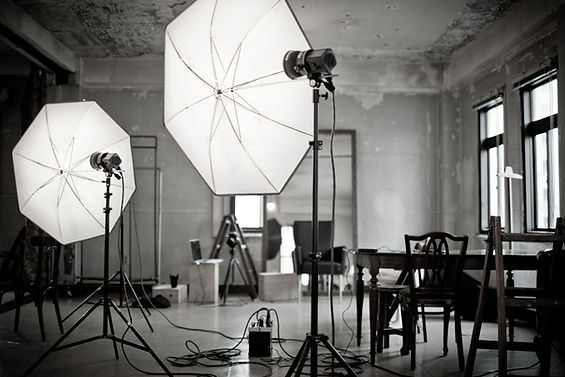
The gallery shows how studio, architectural and outdoor settings change a portrait's context. Notice where the background adds information and where it mostly supplies color or shape.
Move Before You Blur
Look around the edges of the frame and directly behind the head. A pole can appear to grow out of someone; a bright opening between trees can draw more attention than the expression. Try shifting your camera position, changing height or moving the subject where it is safe and permitted.
Make one change, then look again. A small sideways step may hide a distraction without changing the light on the face. Moving the subject could change both the background and the light, so check both before continuing.
Use Distance and Aperture Deliberately
More space between the subject and background can help soften background detail. A wider aperture can also reduce depth of field, but make sure the important parts of the subject remain sharp. In a group portrait, opening the lens fully to hide clutter may leave some faces outside the usable focus range.
Nikon's bokeh explainer illustrates the value of subject-to-background distance. My depth-of-field guide explains how aperture, distance and framing work together.

This comparison illustrates reduced background detail. It doesn't mean every distracting scene becomes useful when blurred. A bright patch can remain a bright patch even when it is out of focus.
Control Brightness and Separation
Check whether the background is brighter than the face and whether hair or clothing disappears into it. You can change your angle, choose a different patch of background or adjust the light. Don't assume the answer is always to make the background darker; sometimes a lighter area gives dark clothing the separation it needs.
Outdoors, my natural-light portrait guide helps with choosing light on the subject. When you add flash, the ambient-and-flash workflow gives you a way to evaluate the face and background separately. Changes to one exposure control can affect more than one part of the picture, so review the result rather than following a fixed recipe.
Keep Props and Color in the Same Conversation
A chair, wall or painted surface can support the composition without becoming the main attraction. Check how the colors work with clothing and skin. Strongly colored nearby surfaces can also reflect colored light onto the person; moving away may be simpler than trying to remove that cast later.

“A useful background gives the portrait context or gives the person room to stand out. If it does neither, change the frame before adding more to it.” — Austen Hunter
Finish the Background Without Losing the Photograph
Editing can remove a small distraction or refine brightness, but review the boundaries around hair, clothing and hands. Generated replacements and blur effects can introduce odd edges, incorrect detail or lighting that no longer fits the subject.

Keep an untouched original and inspect the finished image at a useful viewing size. If the photograph documents a real workplace or event, consider whether changing the scene would misrepresent it. A creative portrait and a documentary photograph have different expectations.
Frequently Asked Questions
What Is the Best Background for Portrait Photography?
One that supports the intended image. A plain backdrop suits a face-led portrait; a meaningful location can help an environmental portrait. Check the light and distractions before committing.
Do I Need an Expensive Lens to Blur a Background?
Not necessarily. Distance between the subject and background, your framing and aperture all matter. Try changing position before deciding you need another lens.
Should Every Portrait Have a Blurred Background?
No. Keep recognizable detail when the setting helps tell the story. Choose enough depth of field for the people and details that need to be sharp.
Can I Fix a Busy Background in Editing?
Sometimes, but it can take more work and introduce artifacts. First try changing your viewpoint, moving the subject or simplifying the scene before capture.
Connect the Background to the Rest of the Portrait
The background works with the expression, light and framing. Use my portrait guide to plan those choices together, then practice one change at a time on your next session.


Comments