
Why Your Softbox Still Looks Harsh: A Portrait Lighting Check
You bought the softbox, put the diffusion on, and the portrait still looks harsher than you expected. Before you blame the modifier, look at what “harsh” means in the photograph. Is the shadow edge sharp, or is one side of the face simply much darker? I’m Austen Hunter of Austen Hunter Photography, a working portrait photographer and the 2024 Navy Civilian Photographer of the Year. I’d start with that distinction before changing the setup.
Key Takeaways
|

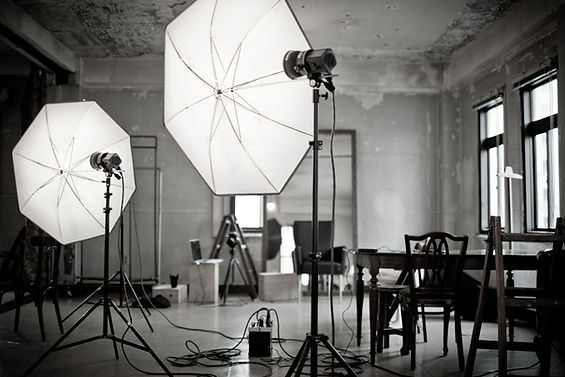
Illustrative studio setup. The position of the softbox matters as much as the modifier you choose.
First, Find the Problem in the Photograph
Look at the edge of the nose shadow and the transition across the cheek. A crisp boundary points you toward source size and distance. A gradual boundary with a very dark shadow side points you toward fill and light direction. Both can occur in the same portrait, so decide which you want to change first.

My portrait photography guide puts lighting in context with composition and direction. For this exercise, keep the pose and framing simple so you can see what the light is doing.
Check How Large the Light Looks From the Subject
A softbox is not automatically soft at every distance. Its apparent size matters: the same modifier looks larger from the subject’s position when it is nearby and smaller when it is farther away. Moving it closer is a useful first test when the shadow transition is too abrupt.
Take a reference frame, move the softbox closer without changing its direction, and adjust flash power to match the original exposure. Compare the shadow edge. Be aware that bringing the light closer can also increase brightness differences between nearer and farther parts of the subject; groups may need a different compromise.
Check that the diffusion panels are fitted as intended and that the flash illuminates the modifier properly. A bright central hotspot with dim edges may behave differently from the evenly lit source you expected.
Dark Shadows Do Not Automatically Mean Hard Light
A large softbox can still create deep shadows. If the transition already looks gentle, try changing how much light reaches the darker side of the face. A white reflector can return some of the key light; a small change in key-light direction may also bring more of the face into the light.
Room surfaces matter here. White walls can return light into the shadows, while a dark room may give you much less fill. A setup that looked open and bright at home can look more dramatic in another location without the softbox changing at all.
Lindsay Adler’s garage lighting demonstration shows how changing nearby reflective and dark surfaces changes portrait contrast. The same observation is useful in a small studio.
What You See | What to Test First |
|---|---|
A sharp nose-shadow edge | Bring the source closer or use a larger illuminated source. |
A soft edge but a very dark cheek | Try a white reflector or adjust the key-light direction. |
Bright skin with lost highlight detail | Reduce exposure and inspect the skin highlights. |
A different look in another room | Check wall bounce and ambient light before changing modifiers. |
Make a Comparison You Can Actually Learn From
Keep the camera, subject, and pose steady. Photograph the original setup, change one variable, and make another frame at comparable exposure. Check both images at the same size. Tethered shooting makes that comparison easier than judging everything from a small rear screen.
Before changing the light, decide what the portrait needs: a softer transition, a lighter shadow, or a different direction. Each asks for a different adjustment. — Austen Hunter
Frequently Asked Questions
Will a Bigger Softbox Always Fix Harsh Light?
No. Distance, how evenly the modifier is illuminated, direction, exposure, and fill all matter. First identify whether you dislike the shadow edge or the shadow brightness.
Does Lowering Flash Power Make Light Softer?
Lower power changes brightness. At the same position and effective source size, it does not itself broaden the shadow transition. Match exposure when comparing different power settings.
Should Every Portrait Have Light Shadows?
No. Deep shadows can be deliberate and flattering. Choose contrast to support the person and the purpose of the portrait, rather than treating all shadows as a problem.
See the Lighting Decisions in a Complete Portrait
Once you can separate softness from contrast, it becomes easier to understand why a lighting setup works. Explore my two-light cinematic portrait breakdown and connect these checks to a complete shoot.


Comments